homelab / Case study
Linux Gateway, DNS & Firewall Homelab
Independent homelab · related infrastructure
An Ubuntu-based home gateway providing separate trusted and guest networks, DHCP, DNS filtering through AdGuard Home, and firewall rules.
Ubuntu Server · UFW / iptables · dnsmasq · AdGuard Home · Tailscale · Docker · Samba · Bash
Read case study as Markdown ↗ambantu@ambatuguard
.',:clooo: .:looooo:. -------------------
.;looooooooc .oooooooooo' OS: Ubuntu 26.04.1 LTS (Resolute4
.;looooool:,''. :ooooooooooc Host: 20C5A0DS00 (ThinkPad Edge )
;looool;. 'oooooooooo, Kernel: Linux 7.0.0-29-generic
;clool' .cooooooc. ,, Uptime: 55 days, 13 hours, 34 mis
... ...... .:oo, Packages: 794 (dpkg)
.;clol:,. .loooo' Shell: bash 5.3.9
:ooooooooo, 'ooool Terminal: /dev/pts/0
'ooooooooooo. loooo. CPU: Intel(R) Core(TM) i5-4300M z
'ooooooooool coooo. GPU: Intel 4th Gen Core Processo]
,loooooooc. .loooo. Memory: 1.18 GiB / 6.97 GiB (17%)
.,;;;'. ;ooooc Swap: 388.00 KiB / 4.00 GiB (0%)
... ,ooool. Disk (/): 19.23 GiB / 233.67 GiB4
.cooooc. ..',,'. .cooo. Local IP (enp3s0): 192.168.1.10/4
;ooooo:. ;oooooooc. :l. Locale: en_US.UTF-8
.coooooc,.. coooooooooo.
.:ooooooolc:. .ooooooooooo'
.':loooooo; ,oooooooooc
..';::c' .;loooo:'
Overview
I configured an old ThinkPad running Ubuntu Server as a home network gateway. The goal was to separate trusted devices from guest and IoT devices, manage DHCP and DNS centrally, and restrict access to selected services.
I used this setup alongside my self-hosted Nextcloud server. It gave me practical experience with Linux networking and troubleshooting connectivity problems affecting devices used by my family.
My Contribution
I configured IP forwarding and NAT so devices on two internal subnets could access the internet through the gateway. I used UFW and iptables to restrict traffic between the subnets and access to the gateway’s management services.
I configured dnsmasq to provide DHCP leases and address reservations, with AdGuard Home advertised as the DNS server through DHCP Option 6. DNS filtering applies to clients using that resolver; this configuration does not prevent clients from using another DNS server or DNS-over-HTTPS.
I also configured local firewall rules on the Debian application server and set up Tailscale for remote administration. When some HTTP transfers stalled, I investigated a possible path-MTU issue and configured TCP MSS clamping in UFW’s before-rules.
Architecture & Network Topology
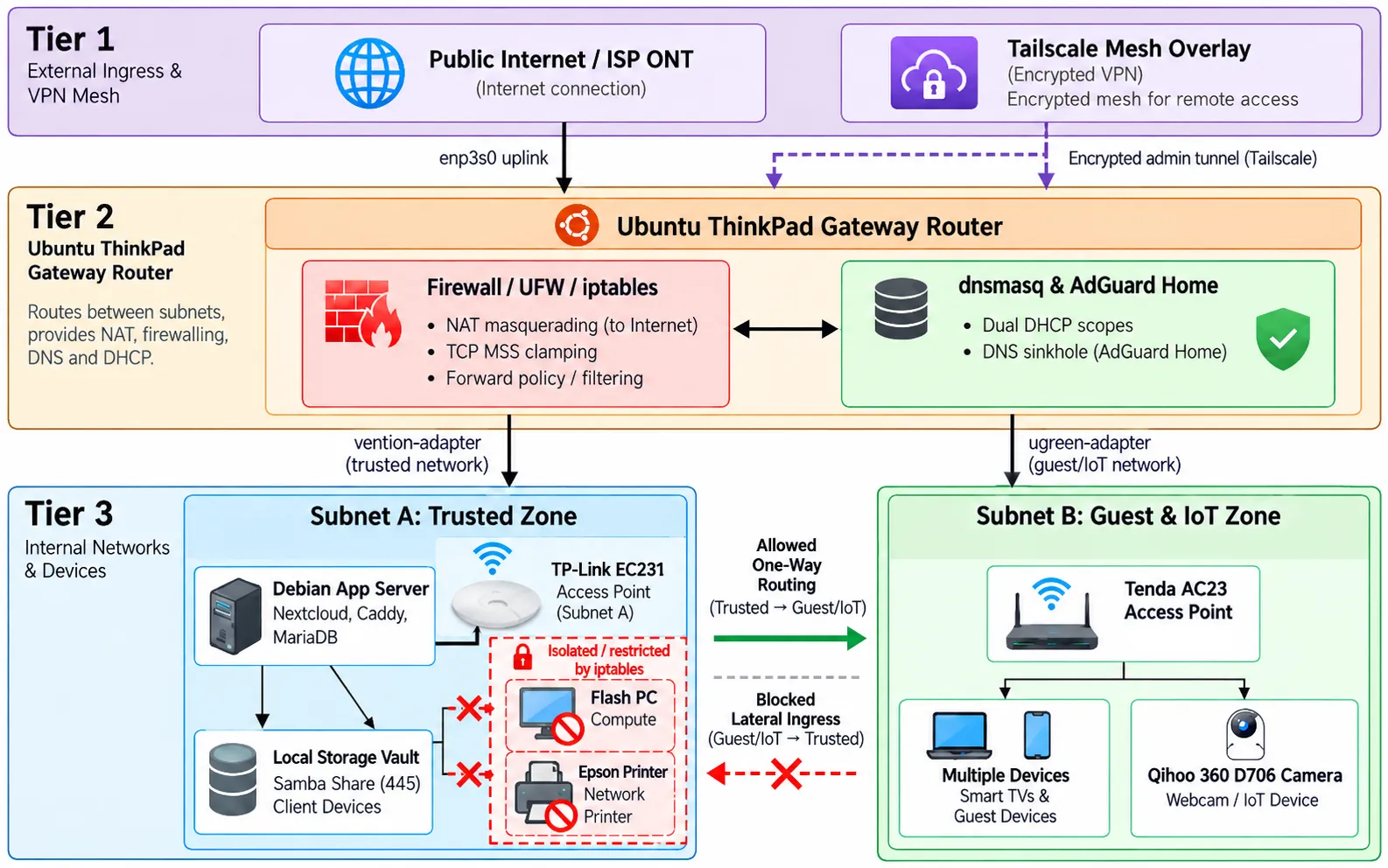
The ThinkPad connects to the ISP router through its upstream interface. Two USB-to-Gigabit Ethernet adapters connect the internal networks. The trusted network, 192.168.10.0/24, contains servers, workstations, and local peripherals. The guest and IoT network, 192.168.20.0/24, contains guest devices, smart televisions, and other appliances connected through a Tenda AC23 access point.
The gateway routes traffic between these networks and applies firewall rules to forwarded connections. NAT provides internet access through the upstream connection. Tailscale provides remote administrative access while the gateway and its network connection are available.
Firewall Rules & Device Access
I used DHCP reservations to give selected devices predictable IP addresses so their firewall rules were easier to maintain. These reservations help with configuration management but do not provide strong device authentication.
For a Windows desktop used for flashing devices, I configured rules to block access to the guest subnet and the gateway’s SSH and Cockpit management ports. On the Debian application server, I restricted connections from that desktop while allowing access to a password-protected Samba share on TCP port 445.
I configured a gateway rule to block the printer’s forwarded internet traffic while preserving local printing. I also placed a camera without authentication on its local feed in the guest network and configured rules to restrict access from the trusted network.
Gateway filtering does not cover every connection within the home network. Devices on the same subnet can communicate directly without passing through the gateway. Local firewall rules restrict access to the servers where they are configured, but do not isolate every device on that subnet.
Troubleshooting
Stalled HTTP Transfers
Some larger HTTP requests stalled while smaller requests completed. One example was a Nextcloud App Store request timing out after approximately 120 seconds.
I investigated a possible path-MTU problem and configured TCP MSS clamping in UFW’s before-rules. This adjusts the MSS advertised in TCP SYN packets to help avoid TCP packet sizes that exceed the path’s MTU.
I did not confirm where packets were being dropped. The available evidence supported investigating an MTU issue, but did not establish an ISP or Tailscale fault.
Limits of Gateway Filtering
While configuring access restrictions, I learned that connections between devices on the same subnet may bypass the gateway’s forwarding rules. I added local firewall rules on the Debian server to restrict access to its services. Those rules protected the server’s services without providing complete isolation for other devices on the same network.
What I Learned & Next Steps
This project helped me understand the difference between traffic addressed to the gateway, traffic forwarded between networks, and traffic that stays within a subnet. I also learned how DHCP reservations, DNS configuration, and firewall rules serve different purposes.
My next steps are to document the configuration files, test allowed and blocked connections, and record repeatable troubleshooting results. I also plan to document how to restore the gateway configuration if the laptop or an adapter fails.